.

- 목적
- PalWorld(팰월드) Dedicated Server 구축
- Linux 이용하여 24시간 가동되는 Server 확보
- 환경
- CPU: x86_64
- Ubuntu 22.04
공식 가이드에서 서버 최소 사양 확인 필요
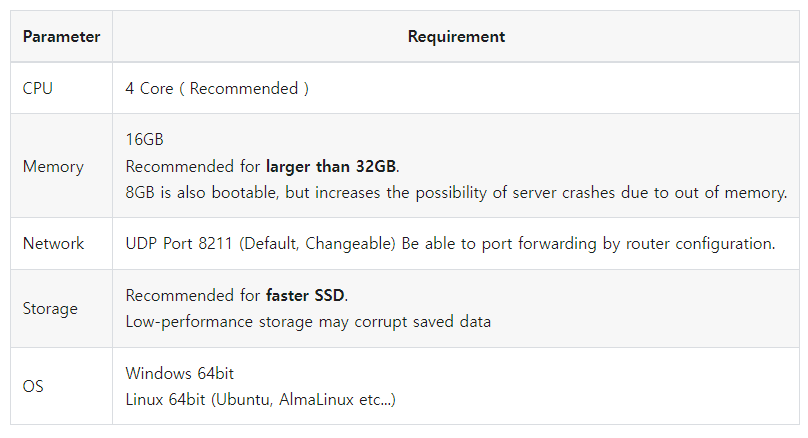
Host Server 업데이트
$ apt update && apt dist-upgrade
SteamCMD 및 Dependency 설치
$ apt install software-properties-common && apt-add-repository main universe restricted multiverse && dpkg --add-architecture i386 && apt update && apt install steamcmd
"steam" 계정 생성
$ apt install sudo && useradd -m steam && passwd steam
새로 생성한 계정으로 로그인
$ sudo -u steam -s
Server 사용하기 위한 Symbolic Link 생성
$ mkdir /home/steam/.steam && cd /home/steam/.steam && ln -s /home/steam/.local/share/Steam/steamcmd/linux32 sdk32 && ln -s /home/steam/.local/share/Steam/steamcmd/linux64 sdk64
Configuration 파일 생성을 위해 Server 실행
$ cd ~/Steam/steamapps/common/PalServer && ./PalServer.sh -useperfthreads -NoAsyncLoadingThread -UseMultithreadForDS
아래 로그 확인 후, "Ctrl + C" 입력하여 Server 종료
steamclient.so: cannot open shared object file: No such file or directory
[S_API] SteamAPI_Init(): Loaded '/home/steam/.local/share/Steam/steamcmd/linux64/steamclient.so' OK.  (First tried local 'steamclient.so')
Shutdown handler: initalize.
Increasing per-process limit of core file size to infinity.
CAppInfoCacheReadFromDiskThread took 4 milliseconds to initialize
Setting breakpad minidump AppID = 2394010
[S_API FAIL] Tried to access Steam interface SteamUser021 before SteamAPI_Init succeeded.
[S_API FAIL] Tried to access Steam interface SteamFriends017 before SteamAPI_Init succeeded.
[S_API FAIL] Tried to access Steam interface STEAMAPPS_INTERFACE_VERSION008 before SteamAPI_Init succeeded.
[S_API FAIL] Tried to access Steam interface SteamNetworkingUtils004 before SteamAPI_Init succeeded.
PalWorld Server 기본 설정파일 적용
$ cd ~/Steam/steamapps/common/PalServer
$ cp DefaultPalWorldSettings.ini Pal/Saved/Config/LinuxServer/PalWorldSettings.ini && nano Pal/Saved/Config/LinuxServer/PalWorldSettings.ini
Server 자동 백업을 위한 "~/palworld-maintenance.sh" Script 작성
#!/bin/bash

# File : ~/palworld-maintenance.sh

/usr/games/steamcmd +login anonymous +app_update 2394010 validate +quit && tar -czvf /home/steam/Palworld_backups/"Palworld_$(date '+%Y-%m-%d_%H-%M-%S').tar.gz" /home/steam/Steam/steamapps/common/PalServer/Pal/Saved && find /home/steam/Palworld_backups/ -mtime +10 -type f -delete
자동 백업 스크립트에 실행권한 부여
$ chmod +x /home/steam/palworld-maintenance.sh && chown steam:steam /home/steam/palworld-maintenance.sh
백업 폴더 생성 및 쓰기 권한 부여
$ mkdir -p /home/steam/Palworld_backups && chown steam:steam /home/steam/Palworld_backups
재부팅 후, Server 자동으로 시작 할 수 있도록 Service 파일 "/etc/systemd/system/palworld.service" 작성
# File : /etc/systemd/system/palworld.service

[Unit]
Description=Palworld Dedicated Server by A1RM4X 0.3
Wants=network-online.target
After=network-online.target

[Service]
User=steam
Group=steam
Environment="templdpath=$LD_LIBRARY_PATH"
Environment="LD_LIBRARY_PATH=/home/steam/:$LD_LIBRARY_PATH"
Environment="SteamAppId=2394010"
ExecStartPre=/home/steam/palworld-maintenance.sh
ExecStart=/home/steam/Steam/steamapps/common/PalServer/PalServer.sh -port=8211 -publicip=125.178.111.184 -publicport=8211 -useperfthreads -NoAsyncLoadingThread -UseMultithreadForDS > /dev/null
Restart=always
RuntimeMaxSec=4h
LimitCORE=0


[Install]
WantedBy=multi-user.target
Service 활성화
$ systemctl enable palworld.service && systemctl daemon-reload && systemctl start palworld.service
기본으로 설정된 Port 번호 8211 사용하여, 외부에서 접속 가능하도록 Port Forwarding 설정
(LG U+ 공유기 기준으로 설명)
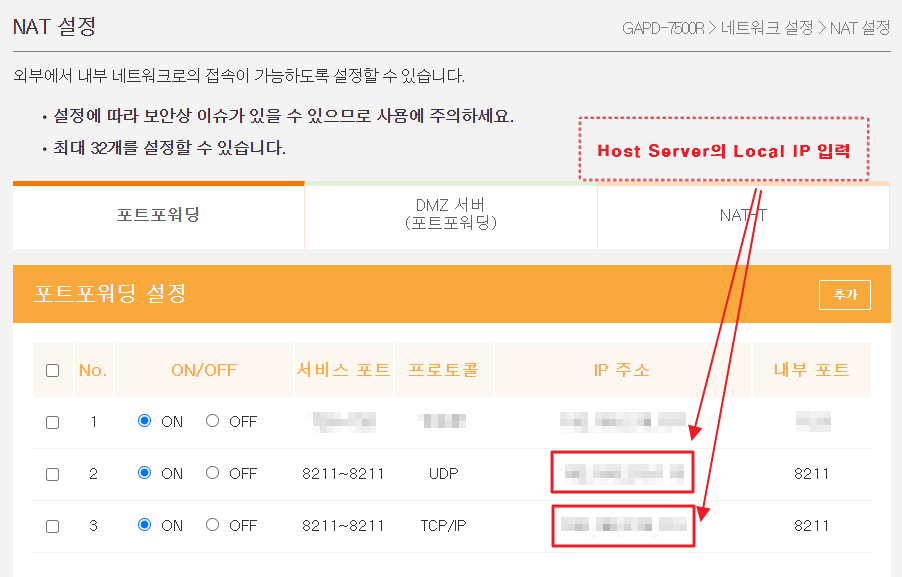
만약 Local IP 확인이 필요하면 아래 명령어 사용
$ ip a
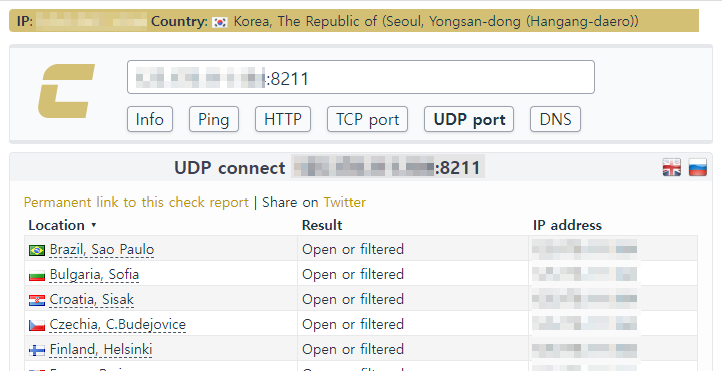
Port Forwarding 정상 동작 확인은 아래의 사이트 이용
( "Global_IP:8211" 입력하여 확인, Global IP 확인은 네이버 및 구글에 "내 IP" 검색하여 간단하게 확인 가능 )
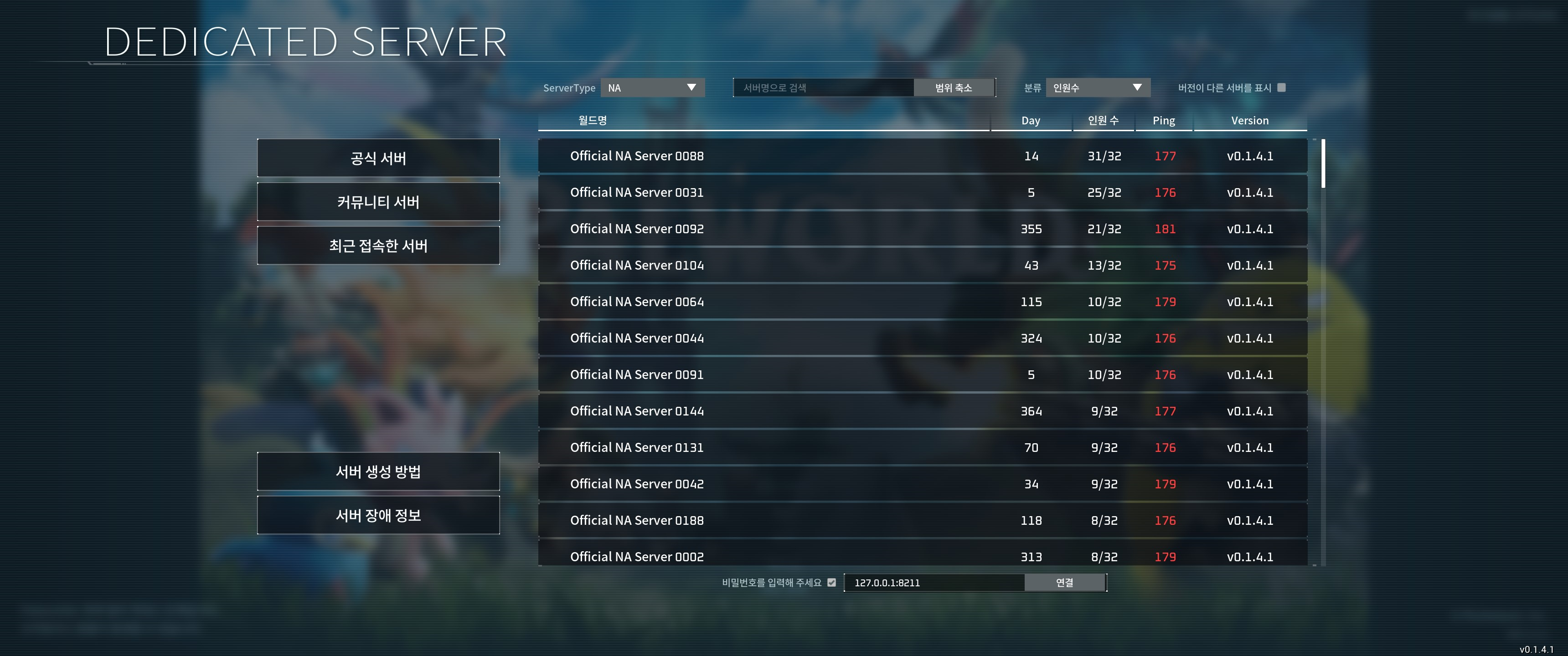
게임 실행하여 Pal World Dedicated 서버 접속

Server 초기화
아래 명령어로 모든 저장 데이터 초기화
$ rm -rvf /home/steam/Steam/steamapps/common/PalServer/Pal/Saved/SaveGames/0/BackUp 불러오기
$ test -d /home/steam/Steam/steamapps/common/PalServer/Pal/Saved && rm -rf /home/steam/Steam/steamapps/common/PalServer/Pal/Saved
$ tar -xzvf /home/steam/Palworld_backups/Palworld_SAVED_DATE.tar.gz -C /
Server 종료
이후에 Server 종료 필요 시, 아래 명령어 사용 (Pal World Server 중지)
$ systemctl disable palworld.service
$ systemctl stop palworld.service
참고 및 출처
https://github.com/A1RM4X/HowTo-Palworld?tab=readme-ov-file
GitHub - A1RM4X/HowTo-Palworld: Set up a Palworld dedicated server on Linux
Set up a Palworld dedicated server on Linux. Contribute to A1RM4X/HowTo-Palworld development by creating an account on GitHub.
github.com
https://github.com/A1RM4X/HowTo-Palworld/blob/main/README-no.steam.md
https://tech.palworldgame.com/getting-started/requirements.
Requirements | Palworld tech guide
On this page, you can learn about the environment required to run Palworld's server.
tech.palworldgame.com
https://diary-developer.tistory.com/41
[팰월드] PalWorld 멀티 서버 설정 하는 방법 - Steam Palworld Dedicated Server, SteamCMD
이전 글에서 멀티 서버 만드는 방법에 대해 이야기했다면 이번에는 멀티 서버 설정하는 방법에 대해 알아보자. 여러 설정들을 통해 자신에게 맞는 쾌적한 환경에서 게임을 즐길 수 있다. Steam Pal
diary-developer.tistory.com
.