목적
- MainLine Kernel(=Vanilla)를 가상머신에서 구동
- Cross Compile 및 HW 가상화 사용 (Host:Ubuntu x64, Target:arm64)
- QEMU 및 BusyBox 사용
Kernel Build
Build Dependency 설치
Kernel Build Dependency 설치 및 CrossComplier 설치
sudo apt-get build-dep linux linux-image-$(uname -r)
sudo apt-get install libncurses-dev gawk flex bison openssl libssl-dev dkms libelf-dev libudev-dev libpci-dev libiberty-dev autoconf llvm
sudo apt-get install gcc-aarch64-linux-gnu
sudo apt-get install g++-aarch64-linux-gnu
Kernel Source Code Download
git clone git://git.kernel.org/pub/scm/linux/kernel/git/stable/linux.git
git tag  | grep 5.19
git checkout v5.19
Kernel Configuration 설정
cd linux
make ARCH=arm64 mrproper
make ARCH=arm64 O=../out defconfig -j$(nproc) CROSS_COMPILE=aarch64-linux-gnu-
make ARCH=arm64 O=../out menuconfig -j$(nproc) CROSS_COMPILE=aarch64-linux-gnu-
menuconfig 화면에서 RAM Disk 지원 기능(CONFIG_BLK_DEV_RAM) 활성화
- Device Drivers
- Block devices
- RAM block device support
- Block devices
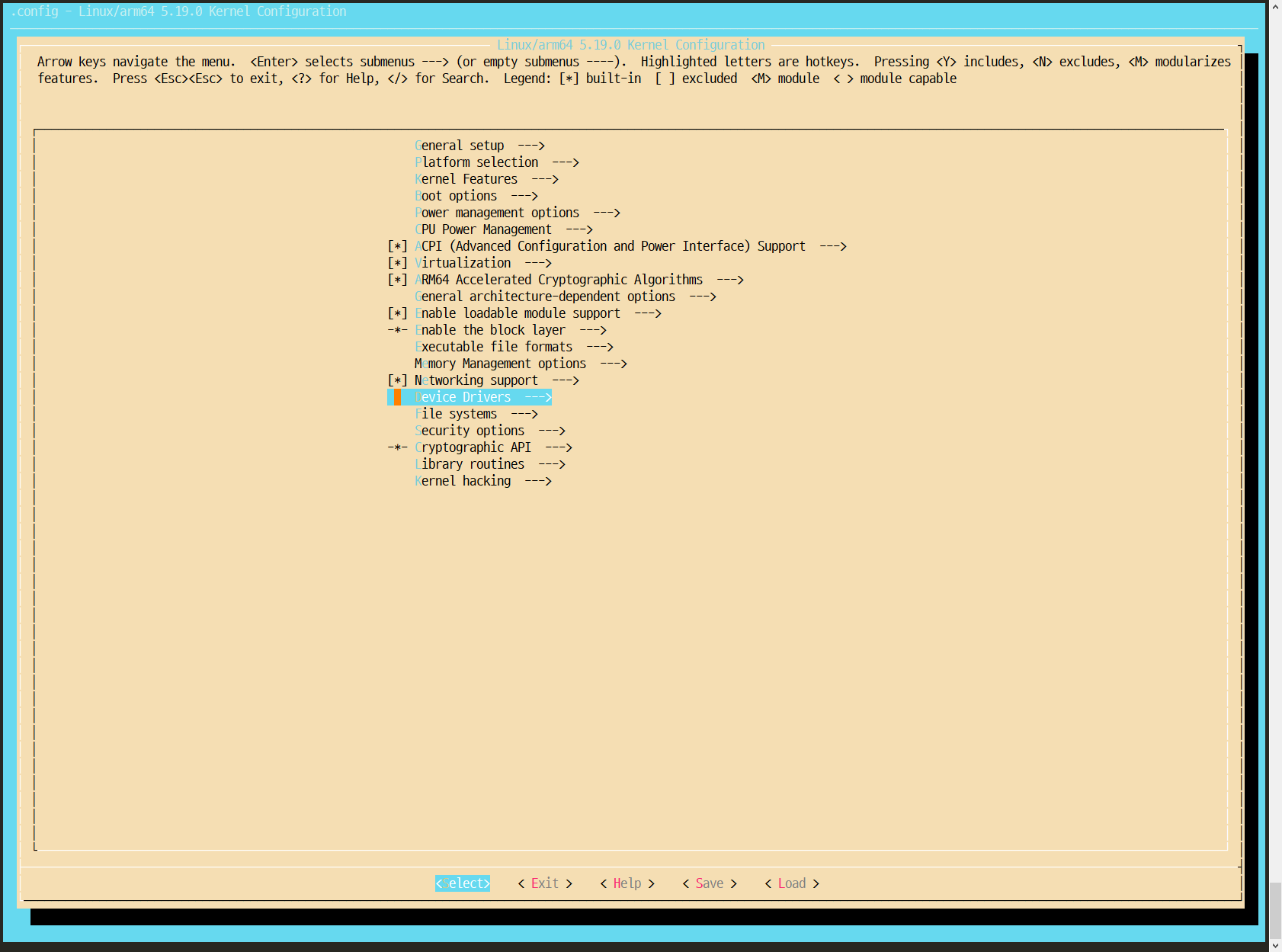
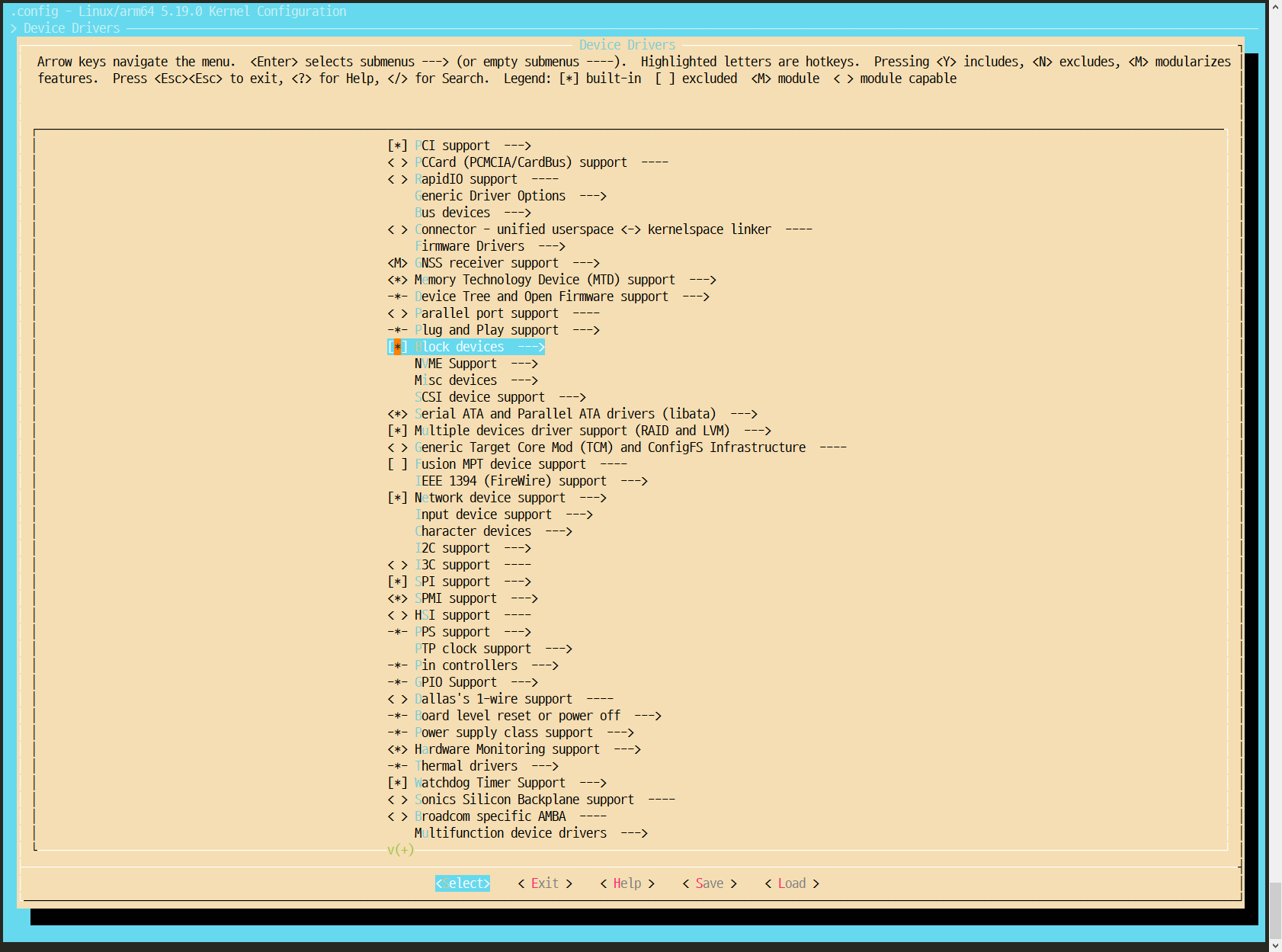
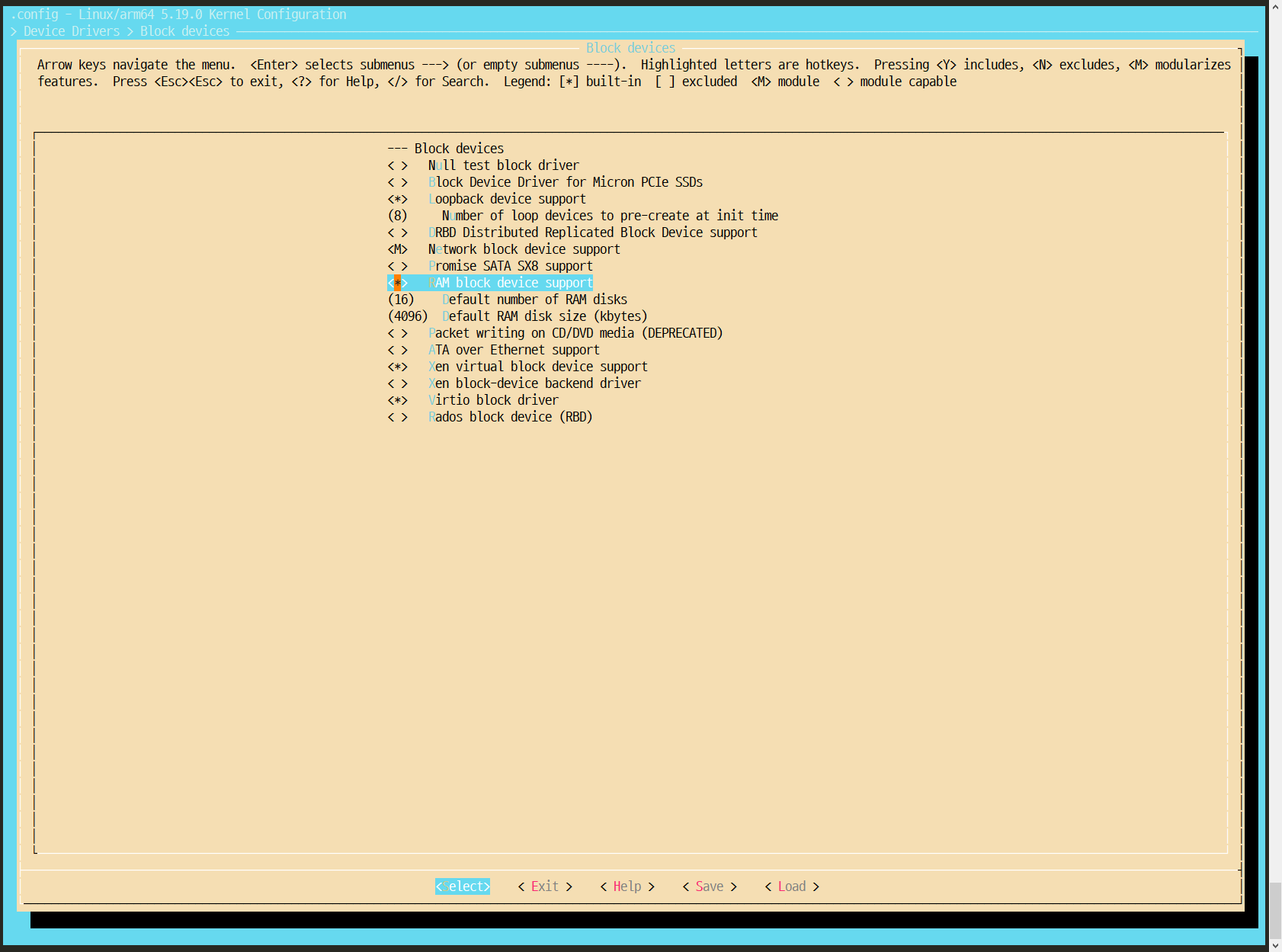
Kernel Image Build
make ARCH=arm64 O=../out -j$(nproc) CROSS_COMPILE=aarch64-linux-gnu-
Booting Image 준비
BusyBox를 이용해서 부팅 가능한 RAM Disk Image 준비
BusyBox 설치
git clone git://busybox.net/busybox.git
cd busybox/
git branch  -a --sort=-committerdate | grep stable
git checkout 1_36_stable
BusyBox Configuration 설정
make ARCH=arm64 CROSS_COMPILE=aarch64-linux-gnu- defconfig
make ARCH=arm64 CROSS_COMPILE=aarch64-linux-gnu- menuconfig
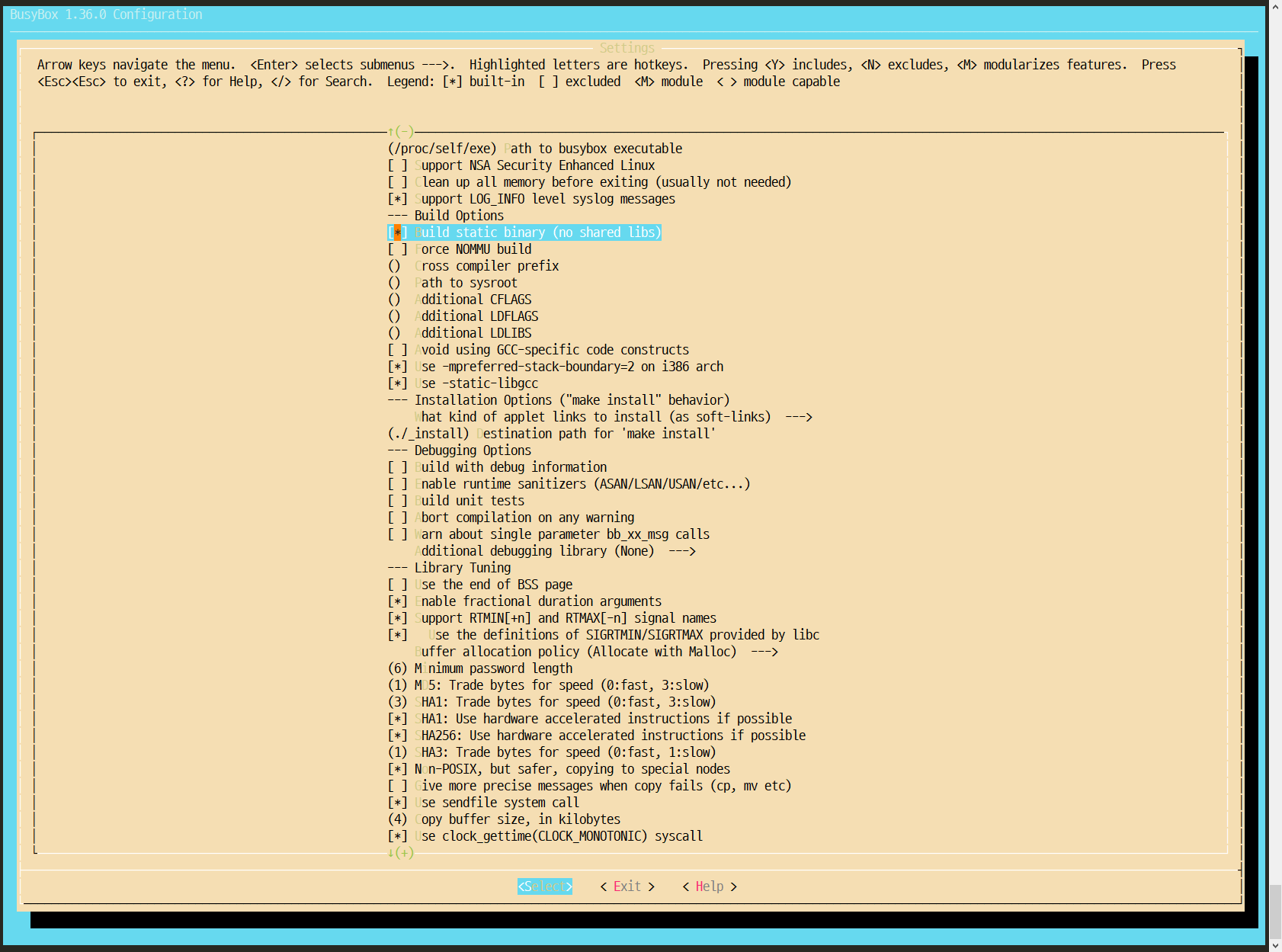
각종 library를 static build하도록 설정
- Settings
- Build static library (no shared libs)
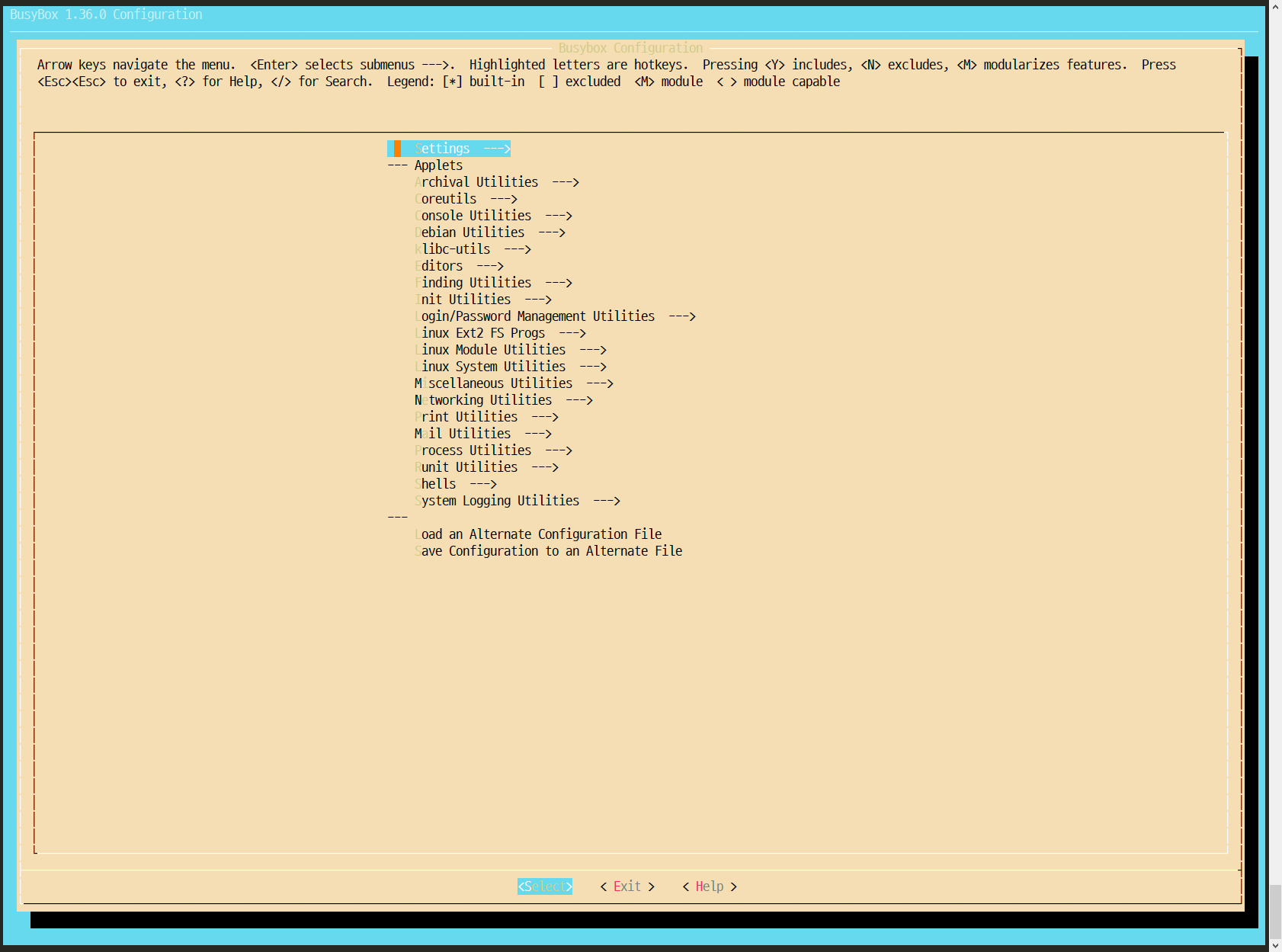
BusyBox Build
make ARCH=arm64 CROSS_COMPILE=aarch64-linux-gnu- -j$(nproc)
make ARCH=arm64 CROSS_COMPILE=aarch64-linux-gnu- install
성공적으로 완료되었다면 _install 폴더 생성
(만약 _install 폴더가 없으면 menuconfig에서 "Settings→Destination path for 'make install'"에서 산출물 생성 폴더 이름 확인 가능)
RamDisk 준비 작업
cd _install
mkdir -p dev etc/init.d home/root lib mnt proc root sys tmp usr/lib var
cp -v /usr/aarch64-linux-gnu/lib/* ./lib/

cat > etc/init.d/rcS << EOF
#!/bin/sh
mount -t proc none /proc
mount -t sysfs none /sys
/sbin/mdev -s
[ ! -h /etc/mtab ]  && ln -s /proc/mounts /etc/mtab
[ ! -f /etc/resolv.conf ] && cat /proc/net/pnp > /etc/resolv.conf
EOF

chmod +x etc/init.d/rcS
find . | cpio -o --format=newc > ../initramfs
cd ..
gzip -vc initramfs > initramfs.gz
생성된 Image를 통해서 Booting후, /etc/init.d/rcS를 실행하게 된다.
이제 initramfs.gz를 RamDisk에 올려서 가상머신이 Booting할 수 있다.
QEMU 설치
arm machine emulator 설치
sudo apt install qemu-system-arm qemu-efi-aarch64(source coe : https://gitlab.com/qemu-project/qemu.git)
QEMU 가상머신 실행
qemu-system-aarch64 \
-machine virt \
-cpu cortex-a57 \
-smp 4 \
-m 2048 \
-kernel out/arch/arm64/boot/Image \
-initrd busybox/initramfs.gz \
-append "rdinit=/sbin/init root=/dev/ram rootfstype=ramfs rw nokaslr" \
-nographic
사용한 Option
- -machine virt
- HW 종류
- -cpu cortex-a57
- architecture 종류
- -smp 4
- core 갯수
- -m 2048
- 메모리 사이즈 (단위 KB)
- -kernel out/arch/arm64/boot/Image
- Kernel Image (Build 완료된 Kernel 경로)
- -initrd busybox/initramfs.gz
- Booting Image (BusyBox를 통해서 생성한 Image)
- -append "rdinit=/sbin/init root=/dev/ram rootfstype=ramfs rw"
- Kernel Command Line
- rdinit : 최초로 실행되는 Process
- oot=/dev/ram rootfstype=ramfs rw : root file system 설정
- -nographic
- graphical 출력을 끄고, shell 입출력을 console에서 수행
실행 결과
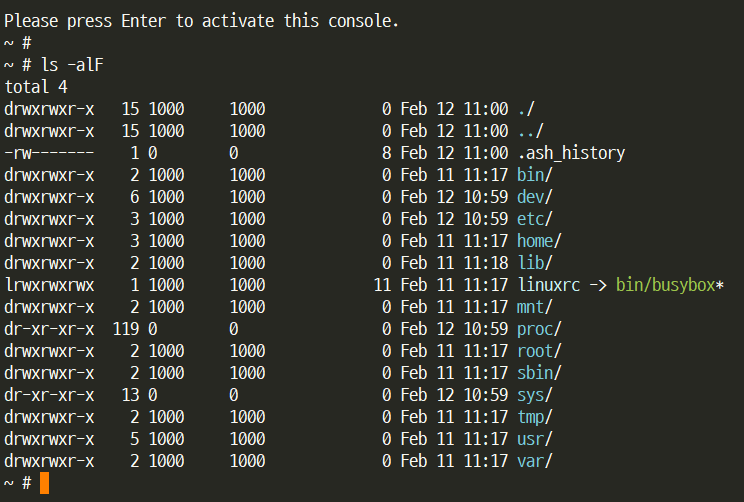
- Ctrl+a, x 입력하여 종료
- Ctrl+a, c 입력하여 qemu console로 Switch 가능
사용한 Tool Version
- Kernel : v5.19
- BusyBox : v1.36
- QEMU : v7.0.0
참고 및 출처
QEMU - eLinux.org
Introduction QEMU is a generic and open source machine emulator and virtualizer, originally developed by Fabrice Bellard. When used as a machine emulator, QEMU can run OSes and programs made for one machine (e.g. an ARM board) on a different machine (e.g.
elinux.org
https://velog.io/@pikamon/Linux-Kernel-3
[Linux] Aarch64 Busybox 크로스 컴파일 방법
QEMU에서 브레이크 안걸고 리눅스 커널을 실행하면 rootfs가 없다고 나온다.여러 가지 방법으로 rootfs를 만들 수 있는데, 그 중 가장 간단한 busybox를 이용한 방법을 정리하였다.Busybox를 Git에서 내려
velog.io
https://www.css-techhelp.com/post/build-the-linux-kernel-and-busybox-and-run-them-on-qemu
Build the Linux Kernel and Busybox and run them on QEMU
This post is a condensed version of Mitchel Humphery's excellent post @ link. Like Mitchel's post, this post gives step-by-step instructions for building a minimal custom Linux kernel, creating a busybox based userland and booting it on an emulator (QEMU
www.css-techhelp.com
https://www.jianshu.com/p/0d94898300d2
qemu-ubuntu-arm64 kernel
安装qemu 安装编译调试工具 下载&编译Busybox 下载&编译kernel Image在目录“arch/arm64/boot” 制作rootfs 执行qemu 先按ct...
www.jianshu.com
QEMU - eLinux.org
Introduction QEMU is a generic and open source machine emulator and virtualizer, originally developed by Fabrice Bellard. When used as a machine emulator, QEMU can run OSes and programs made for one machine (e.g. an ARM board) on a different machine (e.g.
elinux.org
.
'Linux > VirtualMachine' 카테고리의 다른 글
| [QEMU] ARM64 Ubuntu - Custom Kernel (1) | 2024.02.05 |
|---|---|
| [QEMU] ARM64 Ubuntu (with Bridge Network) (1) | 2024.02.05 |
| [QEMU][RaspberryPi] RPI 3B+ Emulation (arm64) (0) | 2024.02.05 |
| [QEMU][GDB] Kernel Debugging (arm64) (0) | 2024.02.05 |


