목적
- QEMU & GDB를 이용해서 Kernel Debugging
- HW 가상화 기능을 이용 : Host/Target이 서로 다른 상황(Host: Ubuntu x86, Target: arm64)
QEMU arm64 실행방법
QEMU의 HW 가상화 기능을 이용해서 arm64 kernel을 실행하는 방법은 아래 링크 참조
[QEMU][BusyBox] MainLine Kernel Emulation(arm64) (tistory.com)
[QEMU][BusyBox] MainLine Kernel Emulation(arm64)
목적 MainLine Kernel(=Vanilla)를 가상머신에서 구동 Cross Compile 및 HW 가상화 사용 (Host:Ubuntu x64, Target:arm64) QEMU 및 BusyBox 사용 Kernel Build Build Dependency 설치 Kernel Build Dependency 설치 및 CrossComplier 설치 sudo ap
jkh1123.tistory.com
Kernel Build
Debug Information 포함 Configuration 설정
2개의 Configuration 활성화
- CONFIG_DEBUG_INFO
- CONFIG_GDB_SCRIPTS
1개의 Configuration 비활성화
- CONFIG_DEBUG_INFO_REDUCED
cd linux
make ARCH=arm64 O=../out menuconfig -j$(nproc) CROSS_COMPILE=aarch64-linux-gnu-
menuconfig 화면에서 다음 기능들 포함하도록 선택 및 활성화
- Kernel hacking
- Compile-time checks and compiler options
- Debug information
- Rely on the toolcahin's implicit default DWARF version (=CONFIG_DEBUG_INFO - ON)
- Debug information
- Compile-time checks and compiler options
- Kernel hacking
- Compile-time checks and compiler options
- Provide GDB scripts for kernel debugging (=CONFIG_GDB_SCRIPTS - ON)
- Compile-time checks and compiler options
- Kernel hacking
- Compile-time checks and compiler options
- Reduce debugging information (=CONFIG_DEBUG_INFO_REDUCED - OFF)
- Compile-time checks and compiler options
Kernel Build
make ARCH=arm64 O=../out -j$(nproc) CROSS_COMPILE=aarch64-linux-gnu-
kernel version 5.19의 경우 gdb helper script 실행 문제가 있다.
build output directory에서 vmlinux-gdb.py를 아래와같이 수정한다.
import os
import os.path

sys.path.insert(0, os.path.dirname(os.path.abspath(__file__)) + "/scripts/gdb")

try:
    gdb.parse_and_eval("0")
    gdb.execute("", to_string=True)
except:
    gdb.write("NOTE: gdb 7.2 or later required for Linux helper scripts to "
              "work.\n")
else:
    import linux.utils
    import linux.symbols
    import linux.modules
    import linux.dmesg
    import linux.tasks
    import linux.config
    import linux.cpus
    import linux.lists
    import linux.rbtree
    import linux.proc
    import linux.constants
    import linux.timerlist
    import linux.clk
    import linux.genpd
    import linux.device
QEMU 실행
qemu-system-aarch64 \
-s \
-S \
-machine virt \
-cpu cortex-a57 \
-smp 4 \
-m 2048 \
-kernel out/arch/arm64/boot/Image \
-initrd busybox/initramfs.gz \
-append "rdinit=/sbin/init root=/dev/ram rootfstype=ramfs rw nokaslr" \
-nographic
Debug Option
- -s
- "-gdb tcp::1234" 동일한 의미, 1234번 포트를 사용해서 gdb 접근
- -S
- 프로그램을 실행하지 않고 대기함 (=freeze CPU)
- -append "nokaslr"
- Kernel Symbol의 Address Randomize 기능 해제
GDB 실행
약간의 GUI기능이 포함된 cgdb를 사용한다.
Debugger 설치
sudo apt install cgdb # 설치하지 않아도 무방
sudo apt install gdb-multiarch
실행중인 QEMU를 Debugging
다른 Terminal에서 GDB 실행한다.
Kernel Build Output Directory로 이동하여 GDB 실행.
cd out
gdb-multiarch vmlinux
(gdb) set architecture aarch64
(gdb) target remote :1234
(gdb) source vmlinux-gdb.py
(gdb) set print pretty on
실행 화면
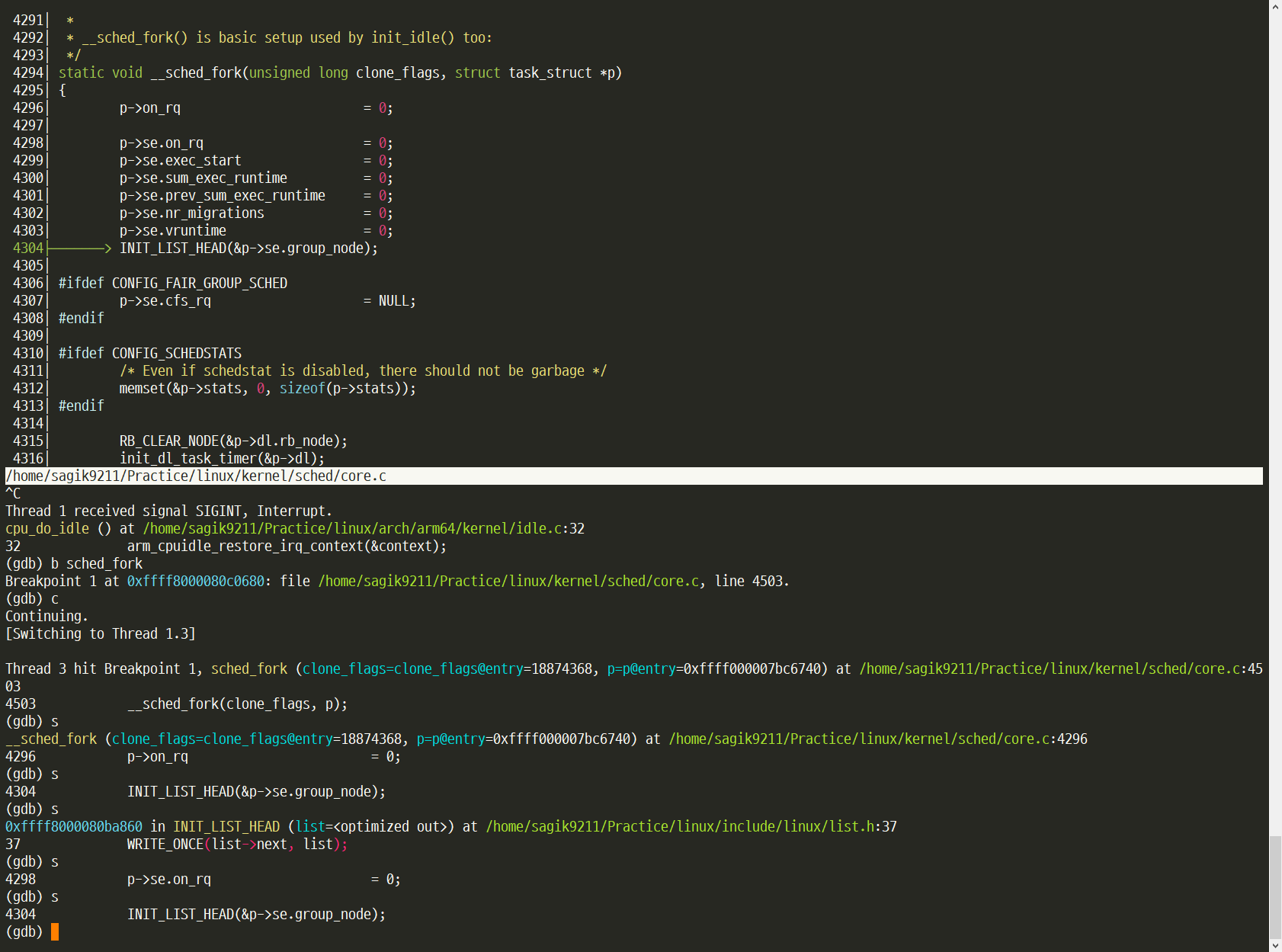
만약, gdb 실행 후, 몇가지 command를 자동으로 실행시키고 싶다면,
ex 옵션을 사용하면 실행하면서 자동으로 command 실행가능하도록 설정 가능
## run_gdb_vmlinux.sh

gdb-multiarch \
     -ex 'set architecture aarch64' \
     -ex 'target remote :1234' \
     -ex 'source vmlinux-gdb.py' \
     -ex 'set print pretty on' \
     vmlinux
자주 사용하는 GDB 명령어
- c
- Break Point를 만날때까지 실행
- n
- 다음 라인 실행, 함수 만나면 실행
- s
- 다음 라인 실행, 함수 만나면 안으로 들어감
- Ctrl+c
- 현재 실행중인 프로그램 중지
- info thread
- thread 정보 표시 (QEMU에서는 CPU 정보 표시)
- thread 3
- 3번 thread로 전환 (QEMU에서는 3번 CPU로 전환)
- info locals
- 지역 변수 정보
- info arg
- 함수의 인자 정보
- layout src
- 현재 실행중인 소스코드 정보
- layout asm
- 현재 실행중인 assembly 정보
- layout regs
- 현재 Core의 register 정보
- Ctrl+x, A
- layout 끄기
- p aaa
- 전역 변수 aaa 출력
- ptye struct task_struct
- "struct task_struct"의 type definition
- bt
- back trace 출력
- Ctrl+z
- GDB 종료
GDB kernel helper script 명령어
- lx-dmesg
- log buffer 출력
- p $lx_current()
- 현재 task 정보 출력
- p $lx_per_cpu("runqueues")
- per_cpu 변수 runqueues 출력
Version 정보
Kernel : v5.19
BusyBox : v1.36
QEMU : v7.0.0
GDB : v12.1
참고 및 출처
https://blog.naver.com/ultract2/221230988537
qemu와 연동한 gdb, cgdb 커널 디버깅 환경 구축하기
- by ultract (LuMinOus) -
blog.naver.com
https://sjp38.github.io/ko/post/qemu_kernel_debugging/
QEMU 를 사용한 리눅스 커널 디버깅 | hacklog
토발즈는 좋아하지 않지만, 리눅스 커널 프로그래밍에도 디버거를 사용할 수 있습니다. 저도 디버거 사용을 좋아하지는 않는 편이지만, 경우에 따라선 디버거를 사용하는게 좋을 때도 있고 취
sjp38.github.io
GitHub - openenclave/openenclave: SDK for developing enclaves
SDK for developing enclaves. Contribute to openenclave/openenclave development by creating an account on GitHub.
github.com
https://lwn.net/Articles/533552/
Add gdb python scripts as kernel debugging helpers [LWN.net]
Add gdb python scripts as kernel debugging helpers From: Jan Kiszka To: Andrew Morton , linux-kernel@vger.kernel.org Subject: [PATCH v4 00/13] Add gdb python scripts as kernel debugging helpers Date: Mon, 21 Jan 2013 18:06:07 +0100 Message-ID: C
lwn.net
https://www.kernel.org/doc/html/v4.11/dev-tools/gdb-kernel-debugging.html
Debugging kernel and modules via gdb — The Linux Kernel documentation
Debugging kernel and modules via gdb The kernel debugger kgdb, hypervisors like QEMU or JTAG-based hardware interfaces allow to debug the Linux kernel and its modules during runtime using gdb. Gdb comes with a powerful scripting interface for python. The k
www.kernel.org
.
'Linux > VirtualMachine' 카테고리의 다른 글
| [QEMU] ARM64 Ubuntu - Custom Kernel (1) | 2024.02.05 |
|---|---|
| [QEMU] ARM64 Ubuntu (with Bridge Network) (1) | 2024.02.05 |
| [QEMU][RaspberryPi] RPI 3B+ Emulation (arm64) (0) | 2024.02.05 |
| [QEMU][BusyBox] MainLine Kernel Emulation(arm64) (0) | 2024.02.05 |


