목적
- QEMU를 이용한 Ubuntu ARM64 가상화
- Custom Kernel Build / Run
환경
- Host : Ubuntu 22.04.3 LTS (x86_64) - jammy
- Guest : Ubuntu 22.04.3 LTS (arm64) - jammy
먼저 아래 링크의 결과로 Guest OS 설치 및 부팅에 성공한 상황을 가정
[QEMU] ARM64 Ubuntu (with Bridge Network) (tistory.com)
[QEMU] ARM64 Ubuntu (with Bridge Network)
목적 QEMU를 이용한 Ubuntu ARM 가상화 Guest OS의 네트워크 설정 (Host와 동일한 네트워크 사용) Host와 Guest의 공유 디렉토리 설정 환경 Host : Ubuntu 22.10 (x86_64) Guest : Ubuntu 22.04.2 (aarch64) Ubuntu 이미지 및 QEMU
jkh1123.tistory.com
또한, Guest와 Host사이에 공유 폴더를 통해서 파일 전송이 가능한 상황을 가정
[Ubuntu] sshfs 공유 폴더 Mount (tistory.com)
[Ubuntu] sshfs 공유 폴더 Mount
목적 네트워크 공유 폴더 생성 관련 Package 설치 $ apt install sshfs 공유 폴더 Mount (접속하고자 하는 server의 IP, 계정정보 및 위치 입력) $ mkdir shared_dir/ $ sshfs user_name@123.456.789.123:/server/dir ./shared_dir .
jkh1123.tistory.com
Guest OS 작업
Kernel Version 및 Code Name 확인
$ uname -r
5.15.0-78-generic

$ lsb_release -a | grep Codename
Codename:       jammy
현재 Root File System이 Mount 되어 있는 위치 확인 (/dev/vda2)
$ mount | grep " / "
/dev/vda2 on / type ext4 (rw,relatime)
가상 머신이 사용중인 Serial Port 확인 (ttyAMA0)
$ dmesg | grep "printk: console"
[    0.863812] printk: console [ttyAMA0] enabled
Kernel Configuration 복사 (→ Host OS)
$ cp /boot/config-5.15.0-78-generic ~/shared_dir
Host OS 작업
Kernel Source Code 다운로드
$ git clone https://git.launchpad.net/~ubuntu-kernel/ubuntu/+source/linux/+git/jammy

$ cd jammy

$ git tag | grep "5.15.0-78"
Ubuntu-5.15.0-78.85
Ubuntu-lowlatency-5.15.0-78.85

$ git checkout Ubuntu-5.15.0-78.85
defconfig 생성 (Guest OS에서 복사해 온 Configuration 활용)
$ cp shared_dir/config-5.15.0-78-generic jammy/arch/arm64/configs

$ cd jammy/arch/arm64/configs
$ mv defconfig defconfig_orig
$ mv config-5.15.0-78-generic defconfig

$ cd ../../..
$ make ARCH=arm64 O=../out -j$(nproc) CROSS_COMPILE=aarch64-linux-gnu- menuconfig
$ cd ..
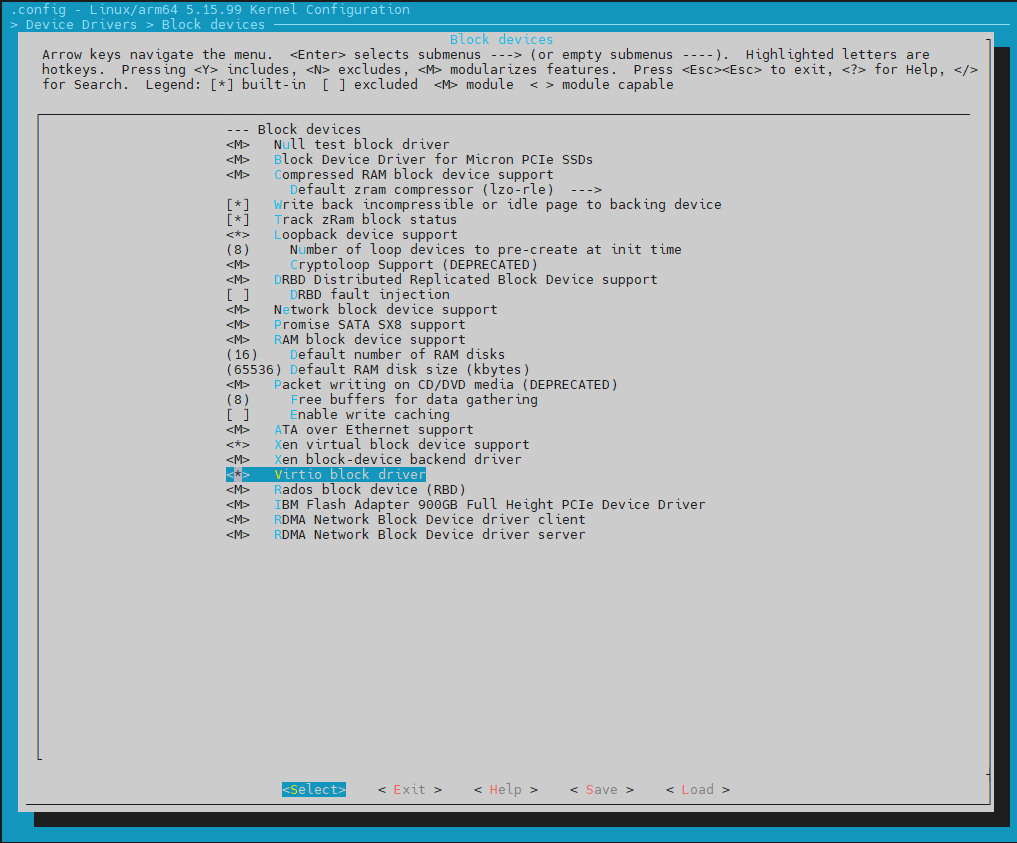
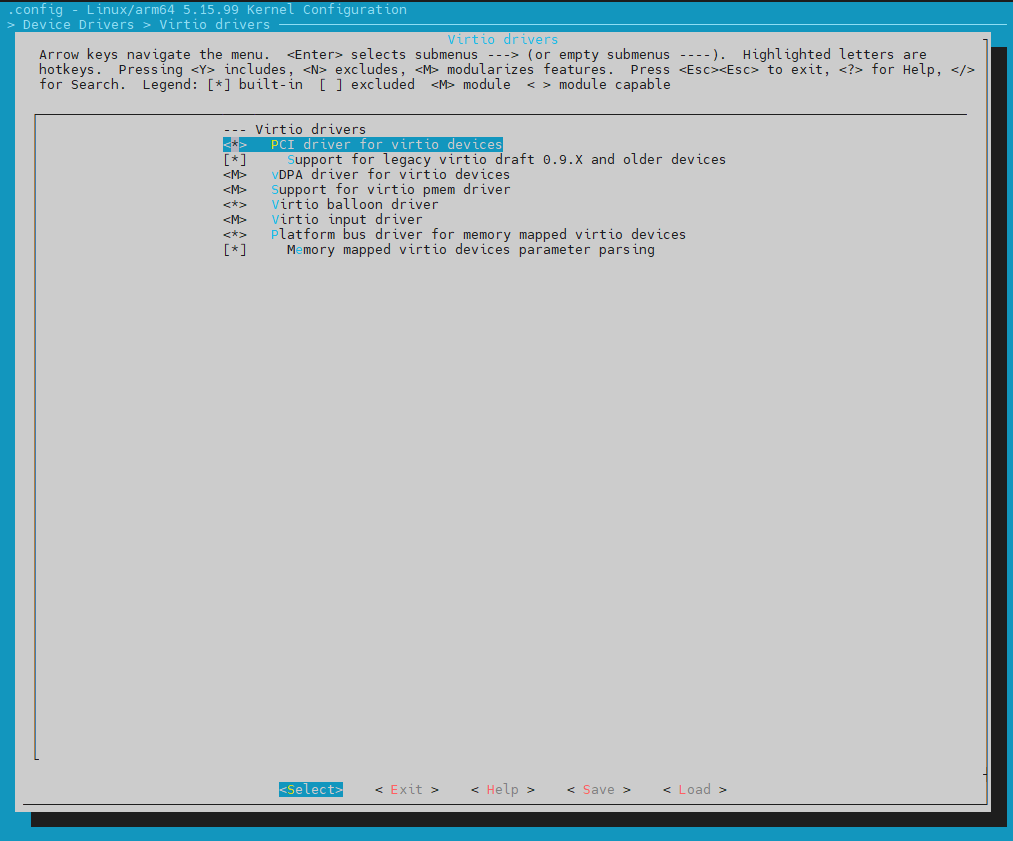
Virtual 환경에서 구동하므로,
Menu 화면에서 CONFIG_VIRTIO_BLK, CONFIG_VIRTIO_PCI 두개 항목을 활성화
Certification 비활성화 위해서 생성된 .config 수정
$ vim out/.configCONFIG_SYSTEM_TRUSTED_KEYS=""
CONFIG_SYSTEM_REVOCATION_KEYS=""
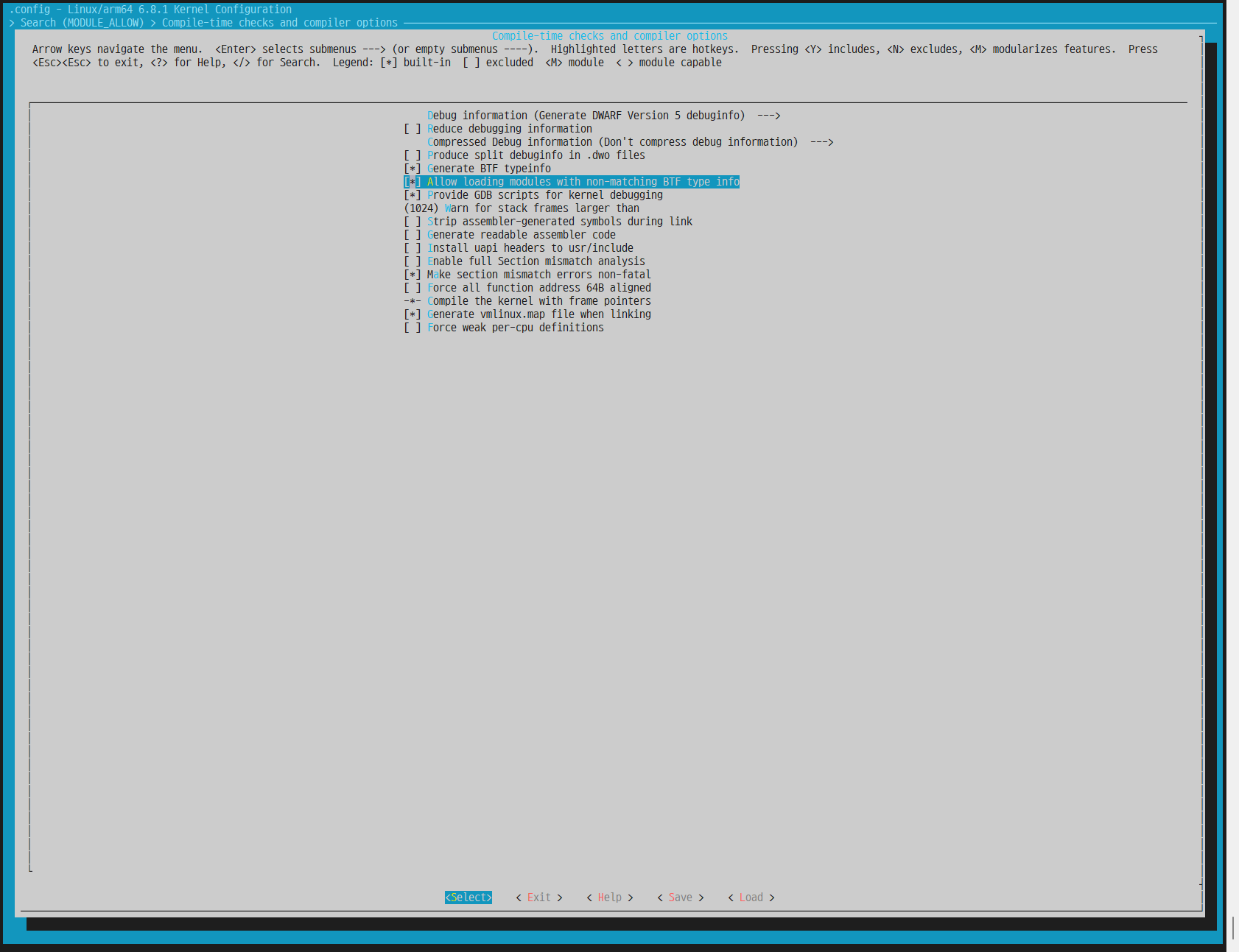
Device Driver업데이트 없이 Kernel만 별도로 업데이트 할수 있도록,
CONFIG_MODULE_ALLOW_BTF_MISMATCH 활성화
Kernel Build 수행
$ cd jammy/
$ make ARCH=arm64 O=../out -j$(nproc) CROSS_COMPILE=aarch64-linux-gnu- Image
$ cd ..
Kernel Binary 경로 및 Boot Argument를 인자로 입력하여 QEMU 실행
(Root File System, Serial 장치 등...)
qemu-system-aarch64 \
                -M virt \
                -cpu cortex-a57 \
                -m 4096 \
                -nographic \
                -smp 4 \
                -drive if=pflash,file=flash0.img,format=raw \
                -drive if=pflash,file=flash1.img,format=raw \
                -drive if=virtio,file=qc2img,cache=none \
                -device e1000,netdev=mynet0,mac=52:55:00:d1:55:01 \
                -netdev user,id=mynet0 \
                -kernel out/arch/arm64/boot/Image \
                -append "root=/dev/vda2 console=ttyAMA0 debug ignore_loglevel ftrace_dump_on_oops" \
                ;
정상적으로 Booting 확인

Package Install 활용
만약 Kernel Header 변경되어 Module을 포함한 업데이트가 필요한 경우 → debian pacakge 활용
Host OS에서 Pacakge Build 수행
$ cd jammy/
$ make ARCH=arm64 O=../out -j$(nproc) CROSS_COMPILE=aarch64-linux-gnu- bindeb-pkg
$ cd ..

$ cp linux-headers-5.15.99+_5.15.99+-3_arm64.deb shared_dir/
$ cp linux-image-5.15.99+_5.15.99+-3_arm64.deb shared_dir/
$ cp linux-image-5.15.99+-dbg_5.15.99+-3_arm64.deb shared_dir/
$ cp linux-libc-dev_5.15.99+-3_arm64.deb shared_dir/
Guest OS에서 Package Install 수행
$ dpkg -i linux-headers-5.15.99+_5.15.99+-3_arm64.deb
$ dpkg -i linux-image-5.15.99+_5.15.99+-3_arm64.deb
$ dpkg -i linux-image-5.15.99+-dbg_5.15.99+-3_arm64.deb
$ dpkg -i linux-libc-dev_5.15.99+-3_arm64.deb
$ poweroff
Kernel 지정 옵션 제거하여 QEMU 실행 → Built-In Kernel 이용해서 Booting
$ qemu-system-aarch64 \
                -M virt \
                -cpu cortex-a57 \
                -m 4096 \
                -nographic \
                -smp 4 \
                -drive if=pflash,file=flash0.img,format=raw \
                -drive if=pflash,file=flash1.img,format=raw \
                -drive if=virtio,file=qc2img,cache=none \
                -device e1000,netdev=mynet0,mac=52:55:00:d1:55:01 \
                -netdev user,id=mynet0 \
                ;
참고 및 출처
https://wiki.ubuntu.com/Kernel/BuildYourOwnKernel
Kernel/BuildYourOwnKernel - Ubuntu Wiki
This page describes how to build the kernel. The majority of users that are interested in building their own kernel are doing so because they have installed Ubuntu on their system and they wish to make a small change to the kernel for that system. In many
wiki.ubuntu.com
https://ndb796.tistory.com/534
우분투(Ubuntu) 커널(Kernel) 소스코드 수정 및 빌드하는 방법
※ 리눅스(Linux) 커널 소스코드 다운로드 ※ 우분투는 전형적인 데비안 리눅스 기반의 운영체제다. 가장 먼저 리눅스 커널 소스코드를 다운로드받는다. 버전별로 리눅스 커널 소스코드를 업로드
ndb796.tistory.com
https://sjp38.github.io/ko/post/qemu_setup_on_ubuntu/
Ubuntu 환경에서 QEMU 빌드 / 설치 / 사용하는 법 | hacklog
Ubuntu 에서 QEMU 를 빌드, 설치, 사용하는 법을 설명합니다. 기본적으로 http://wiki.qemu.org/Hosts/Linux 문서를 참고했습니다. 테스트는 Ubuntu 18.04 머신 위에서 진행되었습니다. QEMU Build sudo apt install libglib
sjp38.github.io
https://askubuntu.com/questions/1329538/compiling-the-kernel-5-11-11
Compiling the kernel 5.11.11
In ubuntu 20.04 LTS; I was compiling the latest kernel 5.11.11 after adding a new system call, during the execution of make command I got this error: make[1]: *** No rule to make target 'debian/can...
askubuntu.com
.
'Linux > VirtualMachine' 카테고리의 다른 글
| [QEMU] ARM64 Ubuntu (with Bridge Network) (1) | 2024.02.05 |
|---|---|
| [QEMU][RaspberryPi] RPI 3B+ Emulation (arm64) (0) | 2024.02.05 |
| [QEMU][GDB] Kernel Debugging (arm64) (0) | 2024.02.05 |
| [QEMU][BusyBox] MainLine Kernel Emulation(arm64) (0) | 2024.02.05 |


